The multi-tenant (shared) nature of cloud computing platforms makes them notoriously prone to failure, as customers of Amazon, Microsoft and many others have learned the hard way.
Is it possible to design applications for high availability when they are hosted on these commodity IaaS (cloud computing) services?
Yes, you can. But you have to ask yourself some tough questions first. We've published this quick guide to cloud availability to get you started.
Over the next three pages we intend to:
- Explore what questions need to be asked when designing for availability.
- Provide three availability models or "patterns" for you to consider.
- Rate some of the world's top IaaS providers according to the maturity of their availability tools.
PART ONE: A BYO AVAILABILITY PRIMER
What could possibly go wrong?
The easiest way to design for availability in any system is to consider one simple question: “What could possibly go wrong?”
Murphy’s Law is a surprisingly effective design aid. Your starting point should be to find every way to break your application, and design a way to either prevent it from happening and the fastest way to recover from it.
There are two main problems you’ll need to deal with: being offline, and losing data. The most critical thing you need to consider is losing data, so let’s start with that first.
LOSING DATA
Losing data is the most common and most destructive form of outage. Computing equipment is generally pretty robust, but humans make mistakes all the time. You may have designed a brilliant system that instantaneously replicates your accounting database to four other locations worldwide.
Now you accidentally delete last month’s invoices. All four copies, worldwide, are gone, instantly.
Forget about backups
Having backups is not what you care about. What you care about is having restores.
My preferred backup solution is disk-to-disk-to-somewhere-else, or D2D2SE. Your primary copy of data is on disk somewhere in your active system. Your first backup is also on disk, either using a disk-to-disk copy, or better yet some sort of snapshot technology if your cloud provider supports it (and they should). Your third, and most important copy is Somewhere Else.
Why do I like this? Because disk is fast, cheap, and easy when it comes to restores. Most of the time, you notice important data is missing within an ohno-second. An ohno-second is the amount of time between when you realise you’re about to make a data-losing mistake (oh no!) and when your finger hits “Enter” and makes the mistake. You want the data back, and you want it now.
Snapshots are fast to take, and fast to restore from. No helpdesk tickets, no waiting around. Logging a ticket, mounting up a tape from last night, and waiting for the data to stream back takes a lot longer, and your time is valuable.
If you’re in the cloud, the Somewhere Else is vital. If your cloud provider is offline for a long time, or loses your data, no SLA in the world will help you. How long can you afford to pay lawyers arguing about SLA clauses if you don’t have a payroll system? Your Somewhere Else is a copy of your data that you control, ready to deploy onto a different cloud provider or your own servers, if you have to. You want to always have it outside the cloud for when disaster strikes.
Key Questions for your Cloud Provider:
- Does the service support disk snapshots for backups? How many, and how often?
- How do I get my data out of this cloud and into another one?
DOWNTIME
You’re probably familiar with “five nines” or “four nines” uptime promises from cloud providers. Four nines, or 99.99 percent uptime, means your site would be offline for about half a second every hour, on average, or just over 8.5 seconds a day. Online cloud providers don’t provide anything like that sort of uptime. As previously reported by iTnews, you’re lucky if you get three nines, which means you’ll be down for one and a half minutes every day.
Disasters are actually quite rare. Losing an entire data centre almost never happens, while people accidentally deleting important data happens all the time. House insurance is important in case you have a fire, but take care climbing ladders to clean out your gutters.
(Australian Bureau of Statistics, Causes of Death 2008: Falls: 1,377; Smoke, fire and flames: 66).
Read on for what availability patterns you should consider...
PART TWO: BYO AVAILABILITY
In IT architecture parlance, generic ways of designing a system are called patterns.
In order to best illustrate how to build your own availability in the cloud, we need to choose a relatively common application that can be designed via some common patterns. We’ve chosen an accounting system – accessible via the internet by an organisation distributed across the country. It will need a database, to store all the accounting data, an application layer, to hold the business logic for manipulating the accounts data, and a web front-end to drive the application. It’s a classic three-tier design.
We’ve chosen an accounting application as it’s a critical business function, but these patterns can be used for essentially any application, from an e-commerce site to a transactional billing system. If you don’t need a web user interface, you just remove that tier and build a two-tier system, or you could build a one-tier database system.
Pattern One: Active/Passive Failover
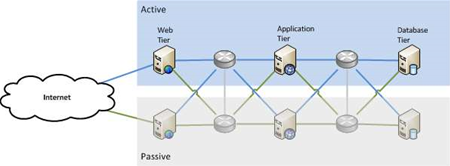
This pattern guards against failure by having two of everything: an active component that runs that part of the service, and a passive component that takes over if the active one fails.
This is by far the most common pattern used in organisations today. The trick is in identifying all the single points of failure (or, as a colleague of mine likes to call them, single points of success). If you miss one, and it fails, the whole service stops.
In the diagram above we have two web servers, two application servers, and two database servers. We have two networks connecting them. Only one of each component is active at any given time. If any component fails, we start using the second one while we fix the one that’s broken. Failing over to the second component can be a manual process, such as an administrator re-starting the service, or it can be automated using clustering software.
The second copy of each component could be at the same physical location, or in another city. This helps to protect against certain kinds of failure, such as a natural disaster in one city that doesn’t impact another. But it also adds complexity and cost to the design. High speed links from Melbourne to Sydney are more expensive than running CAT5 across the data centre.
The biggest benefit to the active/passive pattern is that it is relatively simple to understand, and relatively simple to set up. The biggest challenge tends to be keeping the passive side in sync with the active side: every time you change something on the active side, you have to make sure the passive side is changed too. If you don’t do this, when you go to fail over, the passive side may work differently to the active side.
You’ve also doubled your costs, because you have to buy two of everything. You can reduce your costs by not duplicating everything if you think a given component will be resilient enough (such as the power grid, for instance). The risk you take is that if you’re wrong, your whole service will be dead. Think about what that might mean, and then re-assess the cost of removing the single point of failure (having a diesel generator, using the power grid example).
It’s important to avoid thinking that the passive copy is equipment you’ve paid for and aren’t using. It’s your insurance policy. It is sitting there ready for when you need it, at a moment’s notice.
Key Cloud Questions
- Does my cloud provider have server instances in different physical locations?
- Does my cloud provider offer a scalable database service?
- Can my cloud provider automate server failover?
- Is there an API to help me automate application and server failover?
Pattern Two: Active/Active
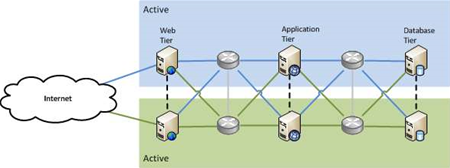
But what if you could use the passive copy as well as the active one to do production work? The active/active pattern does exactly what you’d expect: it uses both sides at the same time.
This pattern is more complex than active/passive because of the data. How do you use two databases at the same time, and not end up with duplicate, or mismatched data? There are techniques to handle this, but they are necessarily more complicated than only ever having a single active database. More complexity means more risk and more cost.
The major advantage to active/active is that, once it is set up, any failures are handled automatically, because you’re essentially already failed over. Both sides of the system are actively providing the service, so people can just keep entering payroll information and won’t even notice if there’s a failure somewhere in the system.
An important note on capacity: try to keep an active/active setup at less than 50 percent utilisation on each side. If one side fails and you’re running at over 50 percent on it, all of that load will end up on the remaining active side, which will now be running over capacity, potentially slow things down or crashing.
Key Cloud Questions
- Can my cloud provider supply load balancers and DNS resolution?
Pattern Three: n+1
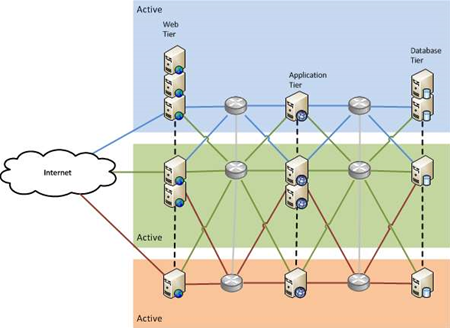
What if there is more than one failure at the same time?
You can protect against this by having more than two components providing the service, as either all active, or some active and some passive. This pattern is called n+1 (or n+m) because there are n components that are needed to provide the service, plus at least one spare. If you have three web servers, and you lose two, the service can keep running, albeit at reduced capacity. The same goes for the database.
Because you now have more components, and a more complex data synchronisation situation, this pattern is more expensive yet again. It provides the highest level of availability of all the patterns described there, and as a bonus, also provides horizontal scalability. If you hire an extra 1000 staff and need another application server to handle the load, you just add one in. With an active/passive setup, you would have to replace your existing servers with bigger ones, which isn’t as easy to do.
Key Cloud Questions
- Can my cloud provider dynamically add and subtract servers on demand?
- Is there an API for me to control my capacity on demand automatically?
Another tip: Fail Often
Hold on. Aren’t we supposed to be preventing failures? That’s true, but to be successful, you need to know that your systems are working. If the only time you ever find out is when you’ve lost all your payroll data, is that really the best time? Is your recovery strategy really “get a new job at another company”?
You need to test your recovery methods, and the more automated, the better. With manual testing, there’s always a temptation to make the test “representative” of a real failure, but not an actual failure. This tells me you don’t really trust your recovery system to work, in which case, why have one? If you don’t fully trust your recovery system, work on it until you do.
I know of companies that run their core systems from their primary site one week, and their secondary site the next. They don’t do DR tests because they’re effectively doing them all the time. Real failures don’t happen at 10am on a Tuesday with freshly caffeinated support teams waiting to hit the big red “restore” button. They happen at 3am on Sunday of the Easter long weekend when your senior admin is on a long service leave camping holiday somewhere in the Great Sandy Desert.
One of the best examples I’ve seen of regular testing is Netflix’s Chaos Monkey, which randomly kills services within their infrastructure. Netflix's ability to recover is constantly being tested, and you can bet they’d be pretty good at it by now.
Read on to find out which cloud providers offer the right tools to build your own availability...
PART THREE: AVAILABILITY TOOLS
We’ve barely scratched the surface of availability, but we hope you’ve got a bit of a taste for what’s possible.
Hopefully you now know some of the questions to ask.
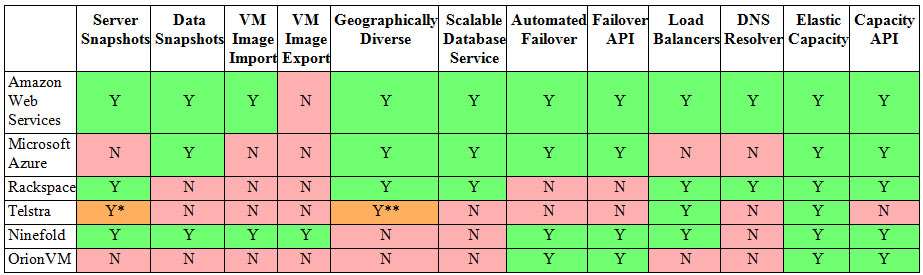
All the major cloud providers (Amazon Web Services, Microsoft Azure, Rackspace) support the patterns described here, though the implementation details vary considerably.
Below we have attempted to do some of the heavy lifting for you by putting together a matrix of what each of the major and local providers offer:
(click to enlarge)
*One snapshot only.
**Within Australia only.
KEY
- Server Snapshots: Can you take snapshots of the virtual machine state for point-in-time restore?
- Data Snapshots: Can you take snapshots of data areas (file or block) for point-in-time restore?
- VM Image Import/Export: Can you import or export VM images into/out of the cloud provider?
- Geographically Diverse: Is the hosting infrastructure available in multiple geographically diverse locations? i.e. two or more data centres more than 100kms apart.
- Scalable Database Service: an RDBMS provided as a service, as distinct from running your own DB on hosted servers. e.g. Amazon's RDB, SimpleDB and Microsoft SQL Azure.
- Automated Failover: The service detects VM failure and automatically restarts it, rather than the user having to detect and fix VM failure themselves.
- Failover API: an API provided for users to automate failover themselves, to take different actions on different failure events.
- Load Balancers: Load balancing between virtual servers provided as a cloud service, rather than externally hosted.
- DNS Resolver: DNS resolution provided as part of the cloud service, rather than externally hosted.
- Elastic Capacity: Ability to scale up, and down, on demand, for compute at a minimum, and preferably storage and network as well.
- Capacity API: Ability to manage capacity (scale up and down) through an API.
Further reading:
For more information, we thoroughly recommend the AWS Architecture site: Set up in the aftermath of a significant outage (previously covered by iTnews), it is designed to educate customers on how to set up their infrastructure to provide the level of availability and recoverability they need, even when AWS has another outage. We would strongly encourage other cloud providers to follow suit.


.jpg&h=140&w=231&c=1&s=0)




 iTnews State of Data & AI Breakfast
 Forrester's AI Forum Sydney
 The 2026 iAwards
.jpg&w=120&c=1&s=0) Integrate 2026
Integrate 2026
 Security Exhibition & Conference





_(1).jpg&h=140&w=231&c=1&s=0)