Microsoft previews Windows 8 user interface


Mimics Windows Phone 7 tile UI.

View larger image
Windows 8 Start Page.
View larger image
Windows 8 lock screen.
View larger image
Using the pinch action, users can shrink app groups to view within the screen.

See all pictures here »

Microsoft has replaced the Windows Start menu with a tile-based screen for its upcoming Windows 8 operating system.
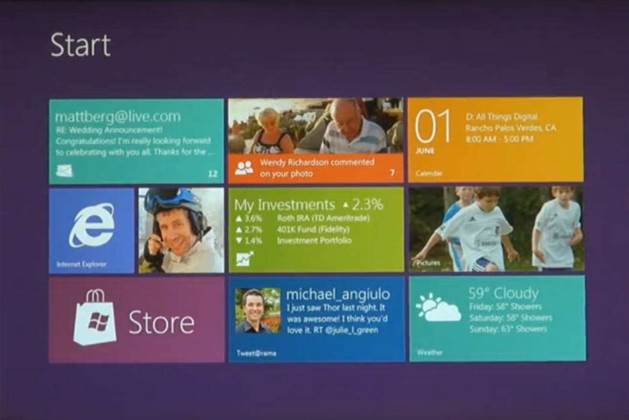
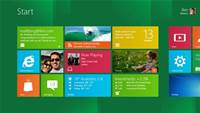
The start page was one of a select few features previewed in a video played at the All Things Digital D9 conference in the United States overnight.

The new start screen – akin to the Windows Phone 7 or Flipboard experience – gives users a “personal mosaic” of “live” tiles representing applications, as opposed to a menu bar or icons.

These “live” tiles can reveal up-to-date information such as the number of new emails, the day’s appointments in the calendar, notifications from social networking feeds, the current time or temperature.

The operating system, which Microsoft said was redesigned “from the chip to the interface”, is based on standard web technologies HTML5 and Javascript to allow for rapid development of applications.

Microsoft said these applications will be controlled by both mouse and keyboard on traditional desktops and laptops, as well as by touch interface on tablets and other slate computers.

The video demonstration shows a Microsoft engineer flicking between applications at rapid speed, a new way of visualising the file system and a more ergonomic ‘thumbs layout’ for typing on touch screens.

The vendor said it will reveal more on the user interface in a series of staged videos during the coming months.


Copyright © iTnews.com.au . All rights reserved.


"win 8 is coming, Mac OSX Lion is releasing. what about the consumers?? how many of the users will be able to grapple with 8 quickly and easily?"
By peterhau


Comments: 17
grump3
Jun 2, 2011 3:38 PM
Why is it that every time M$ brings out a "new improved OS" we lose our previous layout?
Menus & settings are missing, renamed & relocated so that we have to re-learn to set up & use our PCs with no option to revert to the displays & tweaks we're familiar with.
No wonder many of us still use XP to get our work done.
Desk
Jun 2, 2011 4:34 PM
Just because you are used to a system, doesn't mean that it is the best way of doing it.

Windows 7 is vastly superior to XP as the tasks you do most are faster to do than in XP, i had to move back to XP for 2 weeks recently and it really brought out all of the new features in Windows 7 that i use which make my work faster and easier that were not there in XP. (in my mind anyway) but having said that a UI really is a personal experience and what works for one person doesn't always work the next.

I think that it is a very interesting way of setting up the desktop and i'd love to get my hands on a copy of it to play around with.
Bannor
Jun 2, 2011 4:45 PM
Sounds like you dont handle change well.
Windows 7 was a vast improvement over the previous OSes, more intiutive, better compatibility and stable. Faster with a smaller footprint than vista and a x64 client that works well.
"M$" was mildly amusing in 2002.........
dawesi
Jun 2, 2011 9:32 PM
Looks like active desktop is 'alive'!! Microsoft 'fully' embeds the browser in the os!

@grump3 - you're in the minority if you're still using xp! (no really you are litrallyin the minority)
legless
Jun 2, 2011 9:47 PM
This kind of interface might work well on touch devices but I think it will be clumsy with a mouse and keyboard. I like Windows 7 but if this is the way they are going, I'll be sticking with Windows 7.
grump3
Jun 3, 2011 1:39 AM
I'm not disputing the fact that W7 has superior features.
What I find annoying is the fact that many items carried over from XP have been re-named or relocated if not missing entirely (such as RUN & a user defined advanced search) or hidden deeper inside multiple sub menus.

Sure, W7 may be fast & intuitive but nearly every time I want to tweak the system I have to waste time Googling for the answer.
As an example: just recently when I asked 3 W7 users nearby where to find the setting to 'Show hidden files & folders' their combined efforts took at least 10 minutes to locate it.
btone
Jun 3, 2011 2:20 AM
@dawesi: @grump3 - you're in the minority if you're still using xp! (no really you are litrallyin the minority)

no really you are LITERALLY wrong:

http://news.softpedia.com/news/Windows-XP-vs-Windows-7-User-Ratio-2-to-1-186994.shtml

Still 2/1 XP over Vista SP1 (thats Windows 7 by the way)

Why do people have the arrogant impudence to assume that they are superior propellor heads because they like an OS? Windows 7 is a variant of Vista with most of the egregious crap removed, but still Vista in another mode.
grumpybug
Jun 3, 2011 6:45 AM
Well I think that looks interesting. Of course demos always look cool and run well, it will be interesting to see how this pans out in the real world when I'm juggling my word, excel and outlook applications and not flicking through my photos.

On the onscreen split keyboard looks like an interesting innovation.

Of course if they are smart they will still have some form of legacy desktop with the traditional start button, for those people who want to live in the past, in the good ole days of Windows 7
Desk
Jun 3, 2011 7:50 AM
@grump3 - Run command has been replaced by the search in windows 7, you can both run commands / programs and search from the same text box. It's much faster and more powerful once you get used to it. Otherwise if you want an old style run box you can still use Windows key + R

If you are on Windows 7 and can't find an option / setting that you want to set simply type it into the search bar in the start menu and i've found generally it simply comes up with a link to the correct page (eg if you type in show hidden folders it will work)
ray73864
Jun 3, 2011 9:27 AM
I quite like Windows 7, found it easy to use the first time, mind you, i did start using back during the public beta.

the search bar in the start menu for win7 indeed does provide you with all the access you need for finding settings.

However, if you want to find it in explorer itself, just remember your shortcut keys: Alt+T (Tools menu), then navigate to folder options like normal.

As for Windows 8's interface, from the demo it looks like an interesting innovation, would love to try out a copy of it.

If you watch the demo, when he gets to the part where he shows off 'Excel 2010' you'll notice it has the standard start menu button in that picture and the taskbar, i wonder if it will still be like that further along in the development.
Mark D
Jun 3, 2011 11:02 AM
This new Interface is a fantastic step forward for Windows.

With Kinect now being used with a full API available for Windows developers. Just imagine how awesome Kinect would be when paired with this interface. Why touch the screen at all? Gestures are 3 dimensional, far more powerful and hygienic (think hospitals/medical centres).
Ace
Jun 3, 2011 12:27 PM
Yes @MarkD, I am imagining the kind of surgery you might end up with from a nose-pick gesture.
block
Jun 3, 2011 2:09 PM
Does flipping it the bird bring up an automated complaint logging page?
Mark D
Jun 3, 2011 3:34 PM
@Ace. Try something more along the lines of Big Bang Theory - Howard's Robot.

That aside, surgery? Not yet, seriously lacks accuracy. More likely peripheral systems like x-ray image manipulation etc. Removing the keyboard and mouse from a surgery room would be a real benefit.
Ezy2Confuze
Jun 3, 2011 3:57 PM
As long as you can turn features off easily and they implement a nice easy way to create SOE's, I don't really care too much. It would be interesting to see the ratio of corporate installs to home installs of M$ Windows Office etc. M$ needs to be carefull not to tick off the corporates, most companies still haven't upgraded from Windows XP still, probably because of the bad taste Vista left in people's mouths. They also need to sell the products extra features better, since they came out snipping tool and problem steps recorder have been some of my most used applications on Windows 7 (and Server 2008), however you don't see anything from M$ spruiking any of these usefull additional features.
block
Jun 8, 2011 2:47 PM
Snipping tool - http://windows.microsoft.com/en-AU/windows7/products/features

Problem Steps Recorder - http://technet.microsoft.com/en-us/windows/dd320286
peterhau
Jun 10, 2011 5:02 PM
win 8 is coming, Mac OSX Lion is releasing. what about the consumers?? how many of the users will be able to grapple with 8 quickly and easily?
Comments have been disabled for this article.


Top Stories
Australian miners send drones to work
In-depth: Unmanned aerial vehicles in the resources sector.
 
The New Zealand telco problem
Opinion: Could Telstra save Kiwi telcos?
 
IT price probe to 'name and shame' gougers
Industry ducking the issue, committee claims.
 
Sign up to receive iTnews email bulletins
   FOLLOW US...

Latest VideosSee all videos »

Latest Comments
Polls
Should the Government enact new legislation to protect copyright holders in the digital age?

   |   View results
Yes
  19%
 
No
  81%
TOTAL VOTES: 510

Vote