
After testing the mobility waters with a range of Nexus-branded smartphones, Google has finally entered the tablet market with the Nexus 7.


Created in partnership with Asus, the Google Nexus 7 is a seven-inch Android 4.1 tablet that sits in the same budget space as Amazon’s Kindle Fire (a product that is currently only available in the US).
Instead of trying to compete directly with the Apple iPad, Google has opted for a smaller, affordable device that keeps the bells and whistles to a minimum. It subsequently lacks some important features – including 3G connectivity and upgradeable storage – but for the asking price it remains a very impressive tablet.
Display
The Nexus 7 boasts a seven-inch, high-def LED display with a native resolution of 1280x800 pixels, which is roughly in line with other seven-inch tablets on the market.
In recent weeks, we’ve noticed some online complaints from critics and customers alike about the quality of the Nexus 7’s display. While it’s true that colours can look washed out on occasion, we found the display to be perfectly adequate for the asking price.

The Nexus 7 display isn't perfect, but remains solid for the asking price.
HD movies look very impressive on the LED screen – we watched Transformers: Dark of the Moon (which is included free on the device) and found no issues with the picture quality. The display’s 216ppi pixel density, meanwhile, does a good job at displaying text, with all but the most spidery fonts remaining clear and legible. We were also impressed with its viewing angles.
Like most touch screen devices, the Google Nexus 7’s display is quickly marred by fingerprints. Within a few minutes of use, the screen starts to look pretty ugly. Sadly, a cleaning cloth is absent from the sales package, which means you’ll need to rely on your sleeve (and plenty of elbow grease) to keep the screen clean.
Design & handling
The Nexus 7 is undoubtedly an attractive piece of hardware – especially when you take the sub-$300 price tag into account. In terms of style, we believe it holds its own against costlier seven-inch rivals such as the Blackberry PlayBook, Toshiba AT270 and Samsung Galaxy Tab.

The Nexus 7 sports an expensive-looking design.
We were particularly enamored with the contoured, rubberised back – in addition to assisting with grip, this lends the device an elegant, premium feel that belies its budget pricing.
With dimensions of 198x120x10mm and weighing in at 340g, the Google Nexus 7 is one of the more portable options on the market. Unlike a 10in tablet, it can be slipped inside a small bag and carried around with minimal fuss.
Like the rest of the Nexus family, the Google Nexus 7 keeps physical buttons to a minimum. With the exception of power and volume, all controls are relegated to the 7in touch screen. If you're familiar with recent iterations of the Android OS, the oncreen navigation should be second nature.

The Nexus 7 home screen is fixed in portrait mode.
We found the device handled well in both landscape and portrait modes. However, it’s worth noting that the home screen remains fixed in portrait mode regardless of how you hold the tablet. If you’re used to auto-rotating tablets, this initially feels odd and unfamiliar.
Specs & performance
The Google Nexus 7 marks the debut of Google's latest operating system; Android 4.1 (AKA Jelly Bean). Like Android 4.0 before it, Jelly Bean has been optimised to work equally well on tablet and smartphone platforms; thus giving Android users a single OS ecosystem that works across all their devices.
Google has included a guide e-book with the Nexus 7 which goes into detail about what's new in Jelly Bean, but in brief, the main improvements centre around smoother operation, Google Now voice search and the addition of Google Play home screen widgets.
Other key Nexus 7 specifications include a quad-core Tegra 3 processor, 1GB of DDR3 RAM, a choice between 8GB and 16GB of internal storage and the aforementioned Jelly Bean operating system. It also boasts NFC capabilities (via Android Beam), an inbuilt GPS and a front-facing 1.2 MP camera.

The Nexus 7 comes with an ultra-basic front-facing camera.
The camera works about as well as you'd expect from a 1.2MP offering: it's basically just there for video chat. Indeed, Google doesn't even include a camera-launching app out of the box. Instead, you'll need to download this yourself from the Play Store.
In Quadrant, which is a CPU, I/O and 3D graphics benchmark test designed specifically for Android devices, the Google Nexus 7 scored a respectable 3586, which places it just below the Asus Transformer Prime TF201.
Battery life is rated at up to eight hours, which seems like an accurate estimation. During casual on-off use, we found that the battery lasted around two days in-between charges. Like most tablets, the battery cannot be removed or upgraded.
Connectivity & accessories
When it comes to connectivity, the Nexus 7 comes with just the basics. The only physical ports on the device are a 3.5mm headphone jack and a micro-USB port that doubles as a power connector. The USB port does not support storage mounting but can be used to connect USB accessories such as a keyboard and mouse.
The lack of upgradeable storage is one of our few gripes we have with the Google Nexus 7. There’s no micro SD slot, which means you’re stuck with the onboard flash memory. If you opt for the 8GB version, this is bound to fill up pretty fast – especially if you’re a prolific downloader of HD games and videos. Subsequently, we would recommend most users to fork out an extra $50 for the 16GB version.
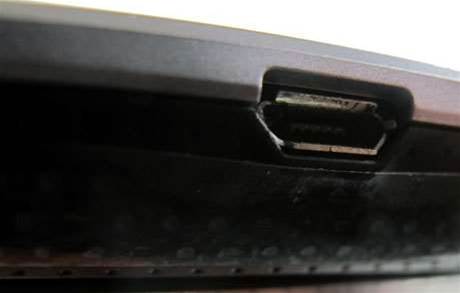
Nexus 7 micro-USB port.
For wireless connectivity, the Nexus 7 makes do with inbuilt WiFi (802.11 b/g/n) and Bluetooth 4.0. Neither the 8GB or 16GB model supports 3G, which means you're limited to tethering and WiFi hotspots when using the device in public.
We appreciate that Google needed to cut some corners to keep costs down, but this is a pretty serious oversight: especially for a device that is so heavily geared towards portability.
As you'd probably expect, the Nexus 7 box contents are pretty bare-bones: in addition to the device itself, you get a power/USB cable and a small instruction leaflet. Tablet necessities such as headphones, a carry pouch and the aforementioned cleaning cloth will need to be purchased separately.
Conclusion
The Google Nexus 7 is an affordable and attractive looking tablet that ticks most (but not all) of the boxes on a casual user's shopping list. Boasting a HD LED screen, a Tegra 3 processor and the latest version of Android Jelly Bean for just $249, it is one of the best budget tablets on the market. If you can live with minimal storage and no access to 3G, you will not be disappointed.



.jpg&h=140&w=231&c=1&s=0)
.jpg&h=140&w=231&c=1&s=0)
.jpg&h=140&w=231&c=1&s=0)


 iTnews Resilience, Rewired Breakfast
 RIMPA Live Convention 2026
 What’s Next?
 iTnews Benchmark Security Awards 2026
 iTnews State of Security Breakfast Sydney






.jpg&h=140&w=231&c=1&s=0)
.jpg&h=140&w=231&c=1&s=0)
.png&h=140&w=231&c=1&s=0)