
At this moment in time, Samsung has it made. Not only has it defeated Apple’s attempts to ban its devices from sale in Europe and Australia (for now), but with the Galaxy S II it has the market’s best smartphone, and it also has the exclusive contract to develop smartphones for Google.
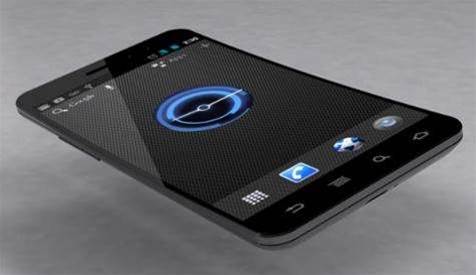
Its second such Google phone is the Samsung Galaxy Nexus, which introduces to the world the latest version of Android, Ice Cream Sandwich.
Android 4, as it shall henceforth be known, borrows features and styling from the tablet-orientated Honeycomb (Android 3) version of the OS, adding new features and a slicker look. We’ll look at it in detail further down this review, but first let’s take a look at the hardware.
The star is the subtly concave AMOLED screen, which measures 4.65in across the diagonal, with an HD resolution of 1280 x 720.
That’s the highest resolution we’ve seen on any smartphone, and the Nexus manages to squeeze it into a chassis weighing only 135g. It’s thin too, although not quite as skinny as Samsung would have you believe: at its thinnest point it measures 8.9mm from front to back, but that swells to 11.7mm at its thickest point.

Under the hood, a dual-core 1.2GHz processor backed with 1GB of RAM powers the Nexus to some impressive benchmark results.
The Nexus ran the SunSpider JavaScript test in 2,005ms – faster than any other smartphone we’ve yet seen. Our new web page load test, in which we time how long the phone loads 28 web pages in sequence, saw the Nexus return a time of 11 seconds, this time a little behind the iPhone 4S’s 9.2 seconds.
Under the Quadrant mobile benchmark, the Nexus scored 1,785 points – quite a way behind the Samsung Galaxy S II’s result of 3,460, but on a par with other Android phones of a similar specification.
Sweet, sweet Ice Cream
Coupled with the new operating system, though, the Nexus feels like a different beast entirely, because the principal benefit of Android 4 is immediacy.
Clicking links, swiping screens, and navigating your way around the new interface is as sharp an experience as it is on Windows Phone and iOS devices.
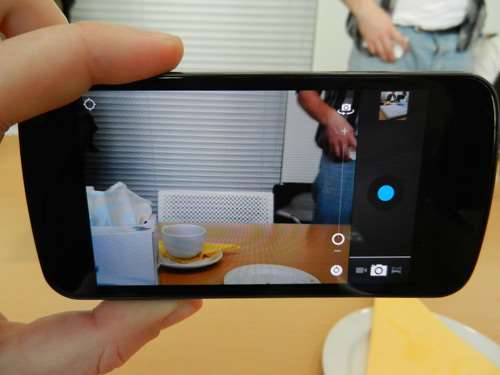
Every link, animation and action happens the moment you touch the screen. And nowhere is this more apparent than in the camera app, where snaps can be fired off as fast as you can tap the shutter button. Ice Cream Sandwich makes this the most tactile Android handset yet.
But what other changes does Android 4 bring? The most noticeable is the look. If you’re familiar with Honeycomb, you’ll recognise the neon blue-on-black colour scheme and modernist font.

It’s cleaner and classier than the previous version, and is perfectly suited to the higher-resolution displays beginning to appear on modern smartphones.
In keeping with the tablet-style approach, Android 4 phones will now also sport an onscreen button bar, replacing the discrete physical or capacitive buttons we’ve become accustomed to. This runs along the bottom of the screen and plays host to three controls: back, home and multitasking.
The first two are self-explanatory; the third pops up a vertically scrolling thumbnail list of recent apps, allowing you to quickly switch between apps or kill them by dragging them off screen.
We’re in two minds about this. On the one hand it’s very elegant, and gives Google the flexibility to change the function of the buttons in future. On the other hand, the button bar is, for the most part, a permanent presence: whether you’re browsing the web, using apps or playing a game it’s always there, occupying valuable screen space.
With the button bar in place, the 4.65in screen on the Galaxy Nexus offers just over 4.3in of usable space (see screenshot above), something worth bearing in mind when comparing specifications with older models based on Android 2.3.
The exception to this is Android's video player app, which slides the bar out of the way during playback. Let's hope other apps, particularly games, soon follow suit.
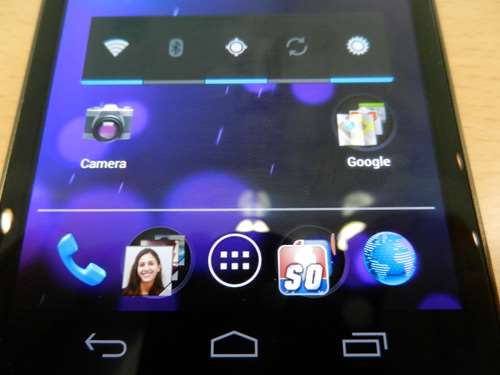
Another implication of the button bar is that Android no longer has a dedicated context menu button. On Honeycomb tablets, this issue is resolved by adding an extra, onscreen button next to the three standard ones for applications that have features accessed via the menu button; on Android 4, a similar button appears in the shape of three dots, again to the right of the three main buttons.
The trouble is that there’s another way of providing commonly used controls within Android 4 apps – via the new translucent Action Bar, which can sit either at the top or bottom of the screen. Google’s intention is clearly to provide developers a more elegant way of presenting menus, but the result is a muddlesome mess, with menus and buttons that appear in all sorts of unexpected locations.
We’re also uncertain how the onscreen buttons will jive with the physical buttons of existing phones (such as the Samsung Galaxy S II), when they eventually get their updates. Hopefully, there will be the option to turn it off.
Finally it's worth mentioning that, at the time of writing, there’s no Flash Player for Ice Cream Sandwich. Adobe has promised an update at some time in December.
Other updates
There are plenty of other, more positive changes, though, from tweaks to the app icons to a slight overhaul of the Android desktop. The Google search widget now resides permanently at the top of the desktop, and persists across all of your multiple desktops (on the Nexus, you get five).
Meanwhile, five persistent shortcuts live along the bottom of the screen, all of which can be replaced with custom shortcuts, aside from the central app drawer launch icon.
The use and creation of folders on the desktop is also slicker than before. To create a new collection of shortcuts and apps, all you do is drag one on top of another on the desktop; this is identical to the way iOS folders work, but without the automatic naming, so we wouldn’t be surprised if Apple takes umbrage.
Other changes include a new, sideways-scrolling app drawer, which comes with an extra widget preview section, so you can see what widgets look like before dropping them on your desktop.
The notifications area now has a natty transparency effect and a shortcut to the phone’s main settings menu. Notifications themselves are more information rich, displaying contact photos alongside text, and you can also dismiss individual notifications.
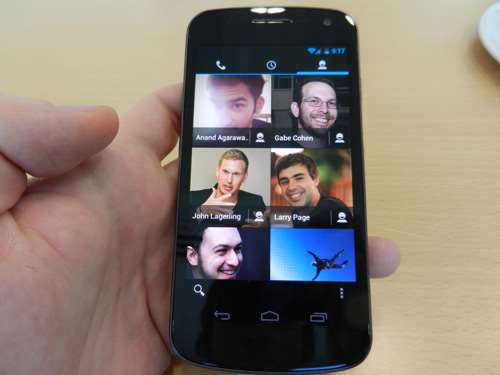
The contacts app has been given a dramatic makeover, now integrating your Google+ contacts along with those from your Gmail and other social media accounts, as have all the core apps. The Gmail, Email, Calendar, Gallery, YouTube and camera apps all look neater and cleaner, and are easier to use.
Finally, there’s a major change under the hood to the way Android addresses storage. Previously, the amount of storage allocated to app installation has always been fixed, with the amount varying from handset to handset; the result was that on handsets with small app partitions you could run out of space after installing only a handful of apps.
Android 4 treats all storage on the phone as one, unsegregated pool, just as in iOS and Windows Phone, so you shouldn’t unexpectedly run out of space.
Hardware letdowns
We’re big fans of Android 4, but despite initial appearances, the hardware it’s running on isn’t a perfect match. The Nexus’s screen is our first concern. It’s crisp, with an incredible pixel density of 319ppi, colours are vivid and contrast fantastic (this is AMOLED, after all). It's a great screen.
However, compared with the Samsung Galaxy S II (300cd/m2) and iPhone 4S (581cd/m2), its maximum brightness of only 197cd/m2 is disappointing. And we’ve covered the impact the button bar has on that seemingly big screen.
The plasticky silver-grey design doesn’t really do it for us either. The phone fits nicely in your hand, but it looks and feels too cheap for the sort of money being asked.
SIM-free, the Nexus is around $770 to buy outright. At the time of writing, a contract Nexus will set you back between $45 and $129 per month, depending on the pricing plan and phone provider you go for (for more info on Australian telco pricing, click here and here).
Delve into the specifications and you’ll also discover there’s no memory expansion – 16GB is all you’re getting.
Battery life is on a par with the Galaxy S II, with 50 percent remaining after our 24-hour test. And the camera is excellent: image quality isn’t quite up with the Galaxy S II’s 8-megapixel stills, but the camera is more responsive. With the Nexus you’re able to snap successive, full-resolution shots as fast as you can physically hit the onscreen shutter button.
Despite these highs, and the love we’re feeling for Ice Cream Sandwich, as a package the Samsung Galaxy Nexus leaves us cold. The screen is high res, but quality isn’t as high as the Samsung Galaxy S II, battery life hasn’t moved on, and the price is extremely high.
If you’re desperate to get your hands on Google’s latest OS, this is your only choice. For now, though, our favourite smartphone remains the Samsung Galaxy S II.






.jpg&h=140&w=231&c=1&s=0)


 Personetics Executive Forum 2026 — Sydney
 Personetics Executive Forum 2026 — Auckland
 Can Testing Keep Up? Quality in the Age of Accelerating Delivery
.png&w=120&c=1&s=0) HPE Networking Day Sydney
HPE Networking Day Sydney
 iTnews Resilience, Rewired Breakfast