
Five tips to kit out your data centre on the cheap

 
Page 1 of 4 | Single page

iTnews does the homework for the thrifty IT manager.

It's an otherwise relaxed Monday afternoon and you've just briefed your CEO on plans to outfit your company's new datacentre with the latest hardware.

You've done your homework and know you're getting the best gear. No more weekend outages, you think, five years of piece of mind. 
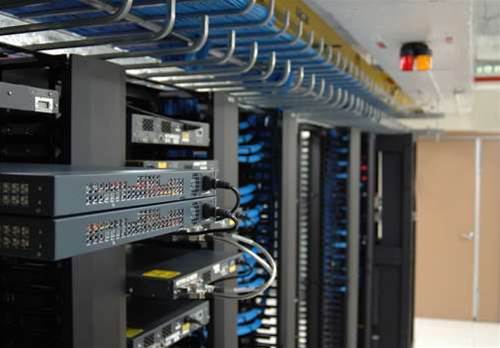
"It all looks great," says your CEO, sipping his coffee. "But we'll need to take some of the fat out to get it past the Board. Can you cut the total price down by say, 20-25 per cent by Friday? Just make it fit."

Ten minutes later you're sitting at your desk wondering how you could possibly meet such a
demand. You can't just ring up Cisco and IBM and ask for 25 percent off!

But don't fret, we've got your back. Thousands of IT managers have been in this exact situation before, and while it's never easy, if you learn the tricks of the buying trade you may even find you have some money left over for that desktop videoconferencing unit the CEO has been daydreaming about.

So here they are, five tips to get you started.

  • Tip Number 1: Squeeze the vendors
  • Tip Number 2: Spot the fires
  • Tip Number 3: Sniff around the ISPs
  • Tip Number 4: Re-purpose
  • Tip Number 5: The formal secondhand market

Read on for each in detail...


Five tips to kit out your data centre on the cheap
"Graeme, all your suggestions would only be appropriate for very small and budget conscious businesses. This article is for a larger operation, where I wouldn't use any of your advice (no ..."
By Daff42


Comments: 5
ahh_bugger
Feb 1, 2010 4:59 PM
Are you serious? If l kitted my data centre with second hand stuff that had no support, no waranty, no service history and no supported life cycle i woiuld loose my job the day it fell over. Only a fool would take this advice
Tinrib
Feb 1, 2010 10:00 PM
Learn to build better business cases.
Riiiiiiiiiiiggght.....
Feb 2, 2010 12:34 PM
Maybe there's a reason why you're a "former" systems administrator...
Graeme Harrison (prof at-symbol post.harvard.edu)
Feb 2, 2010 4:17 PM
Of course some people would object to such advice... but some will welcome it as well.

I think the biggest issue is to leave servers alone as much as possible... and that means getting an extended life out of it as well... till it needs to be replaced.
And a server can be souped-up by adding a Solid State Drive (SSD), even via e-SATA (external SATA connection), provided your database or other intensive apps will happily sit on a 130GB SSD (c$200 from www.msy.com.au).

And slightly ageing laptops with smallish hard drives can have their useful lives extended by replacing the c100GB SATA drive with a 500GB 2.5-inch SATA drive ($109 from MSY).

And the Acer e-Machine desktop ($298 from JB HiFi without monitor) are quite reasonable regular workstations (AMD 1.6GHz CPU), esp if you beef them up from the as-shipped 1GB of RAM to 3GB (extra 2GB DIMM from MSY is $55).

But anyone can lose a server at any time... the issue is to never lose the data. The best way is to buy enough of the USB-connected external 2TB hard drives (with in-built RAID) and keep backing up. For small-medium sized companies, just one of those 2.5-inch sized 500GB drives ($109) in an external 2.5-inch SATA enclosure ($35 from MSY) will give you a 500GB backup drive that can conveniently sit in your shirt pocket, so you DO take a copy off-site.
Daff42
Feb 3, 2010 5:46 PM
Graeme, all your suggestions would only be appropriate for very small and budget conscious businesses. This article is for a larger operation, where I wouldn't use any of your advice (no offense). Some of the advice in the article is equally useless. I would suggest it be reduced to 2, the existing number 1, and number 2: Shifting the issue back to the CEO. Tell him what you can do, and what reducing the costs now would actually mean(in terms even a CEO could understand).

Whenever I walk into a data centre that has re-purposed desktop machines I cringe, and if I was starting at a company with some of these, I would be rapidly suggesting a migration of all of them to a virtual environment.

The real issue here in this whole article is not how to save money, but how to sell an idea to the CEO/CIO.
Comments have been disabled for this article.


Top Stories
The New Zealand telco problem
Opinion: Could Telstra save Kiwi telcos?
 
IT price probe to 'name and shame' gougers
Industry ducking the issue, committee claims.
 
Revealed: 2012 e-government award winners
Government highlights projects, professionals of the year.
 
Sign up to receive iTnews email bulletins
   FOLLOW US...

Latest VideosSee all videos »

Latest Comments
Polls
Should the Government enact new legislation to protect copyright holders in the digital age?

   |   View results
Yes
  19%
 
No
  81%
TOTAL VOTES: 480

Vote