
Microsoft has unveiled its consumer preview of the Windows 8 operating system together with a new tool to configure perhipherals to take advantage of new OS features.
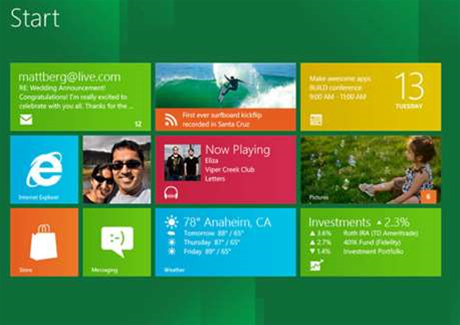


The preview also marked the "beta opening" of the Windows Store where apps from third-party developers and Microsoft would be available free of charge.
Consumers who download Windows 8 preview will have the option to sign on with a Microsoft account to take advantage of cloud services that could operate across a Windows PC/Windows Phone environment.
The operating system release also comes with Internet Explorer 10 platform preview 5, which uses hardware acceleration for better web performance, Microsoft said.
Microsoft warned in a blog post, however, that the preview is not production software and therefore some caution should be taken before it is installed by non-technical users.
"The Windows 8 Consumer Preview is just that: a preview of what's to come," Windows team member Kent Walter said.
"It represents a work in progress, and some things will change before the final release. This means you'll encounter some hiccups and bugs.
"If you're used to running prerelease (beta) software, you're OK with a little troubleshooting, and you don't mind doing a few technical tasks here and there, then you'll probably be OK giving the Windows 8 Consumer Preview a spin.
"If a list of hardware specs is a little overwhelming for you, or you're not sure what you'd do if something unexpected happened, this might not be the time to dive in."
As with previous OS previews, Microsoft would not be offering official user support for those that install the operating system.
However, users were encouraged to report bugs and issues and could find answers or workarounds from other system testers on Microsoft forums.
Hardware specs
To coincide with the preview, Microsoft has released detailed hardware specifications to show users what is required to take advantage of the operating system on PCs and - perhaps more importantly - on touchscreen devices.
Microsoft makes it clear that Metro style apps require a minimum screen resolution of 1024x768 - any less and users will see only an error message.
Metro is the lightweight "app centric" Windows Phone 7 tile-style graphical user interface.
Microsoft said that the Windows 8 preview is supported on "a number of existing Windows 7 touch devices"; however, it warned that the new operating system "places a greater demand on a high quality experience than could have been foreseen when manufacturers were developing hardware for Windows 7".
"Our data is showing that a vast majority of Windows 7 touchscreens will perform well for Windows 8," the company said in a blog post.
"This means that touch drivers continue to load, and you'll be able to perform basic touch interactions with a reasonable degree of success."
Tablets confirmed by Microsoft to work include the HP Elitebook 2760p convertible and ASUS EP121 tablet (however, neither has the screen resolution to use Snap, a feature of Windows 8 that allows users to multi-task by running two apps side-by-side in the screen real estate).
Other devices that work include the Samsung Series 7 slate, Lenovo x220t convertible and Dell Inspiron Duo convertible devices.
In a separate blog post, Microsoft warned that the compatibility of the tablet device would depend on the number of "simultaneous touchpoints" it supported.
"If you want to use touch, you'll need a multitouch-capable laptop, tablet, or display," the firm said.
"Windows 8 supports up to five simultaneous touch points, so if your hardware doesn't, you may find typing on the onscreen keyboard and using certain controls more of a challenge."
For general PCs, the preview requires a minimum 1 GHz processor, 1-2 GB RAM, 16-20GB hard disk space and a DirectX 9 graphics device.
Microsoft noted that some features would require tinkering in BIOS settings or specific drivers to operate. More information is available here.
Virtual machine tests?
Microsoft issued an advisory against running the consumer preview in a virtualised environment for test purposes.
"Our recommendation for the Consumer Preview is to run it natively on hardware if you intend to run Windows 8 on hardware when the product is final," Microsoft said.
"Some of you will run virtualised environments for enterprise workloads or specialised purposes, but we strongly recommend that you experience Windows 8 on hardware, as it was designed to run for the majority of consumer experiences."
The company said that running the OS on hardware would allow it to take advantage of hardware acceleration for graphics.
"If you do run in a VM, which is supported as expected, please be sure your screen size meets the minimum requirements," the company said.
Configuring peripherals
Coinciding with the Windows 8 preview is the release of Microsoft Device Center, a beta tool that allows users to remap their mouse or keyboard using IntelliPoint or IntelliType technology respectively to take advantage of the new operating system.
Microsoft also said it would be updating its Touch Mouse peripheral to work natively with Windows 8 - though availability would not come in time for preview users.
Read the iTnews three-part Enterprise Guide to Windows 8
Have you downloaded the consumer preview? What do you think?



.jpg&h=140&w=231&c=1&s=0)

.jpg&h=140&w=231&c=1&s=0)




 iTnews State of Security Breakfast
 iTnews State of Data & AI Breakfast
 The 2026 iAwards
.jpg&w=120&c=1&s=0) Integrate 2026
Integrate 2026
 Security Exhibition & Conference







_(1).jpg&h=140&w=231&c=1&s=0)