
A new edition of Ubuntu arrives every six months, bearing a new zoological codename. The latest is version 11.04 (reflecting its April 2011 release), known to its friends as the Natty Narwhal.
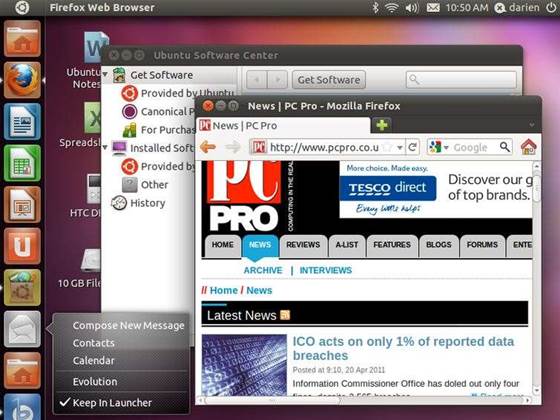
You’ll notice one change before you even download the installer: the Netbook Edition has been retired, so there’s now only one ISO for all home computers. It’s a wise move; one standard installation makes life easier for beginners and developers alike.
Boot into Ubuntu 11.04 and you’ll see another change. The Gnome desktop has been replaced by the Unity interface that made its first appearance in the 10.10 Netbook Edition. You can still install Gnome, or download the Xfce-based Xubuntu distribution, but Unity is now the default.
It’s a controversial change, but we reckon it’s an improvement. The Launcher at the side of the screen is far more inviting than Gnome’s niggly menus, and it makes better use of a widescreen display. The way the icons work – click to launch, right-click for options – will come naturally to anyone familiar with Windows 7 or OS X.
The Ubuntu button at the top-left of the screen opens a searchable index of files and applications, which will again be familiar to anyone who’s used Spotlight on the Mac or the Windows search box.
Unity itself has been jazzed up since its netbook-only days. Launcher icons are more colourful and detailed than before, although the background remains a miserable grey even if you select a brightly coloured desktop theme.
And the Launcher now hides when you set an application to full-screen mode, which can be done by dragging it to the top of the display, just like in Windows 7. This works on netbooks as well as full-sized PCs, and netbook users can save files to the desktop too – an option frustratingly disabled in 10.10.
The main menu bar has been updated, so application menus can now appear here, Mac-style. It’s a small change, but it saves screen space and adds a welcome sense of coherence.
The last notable interface change is support for multitouch interfaces. Unity’s button-driven design is already better suited than Gnome to finger-driven devices; and a feature jovially named Love Handles adds touch-friendly controls for moving and resizing windows. We couldn’t get this to work, but hopefully an update will remedy that.
For us, the most significant update to Unity isn’t a question of features, but of performance. Even on an ageing netbook, Unity felt more responsive than the 10.10 Netbook Edition.
We saw particular improvement when searching for files and programs using the Ubuntu button. Before, the search window took a second or more to appear; now it pops up almost instantly, and results often appear before you’ve finished typing.
In terms of applications, the most interesting update here is the Ubuntu One Control Panel. Although Canonical’s cloud storage system isn’t new, this graphical interface at last makes its services – including synchronising files, contacts and bookmarks – easy to use.
In future, Ubuntu’s OneConf tool could be integrated too, allowing your entire application setup to be mirrored across PCs, but this isn’t here yet.
Beyond that, Canonical has merely tweaked the bundled software. OpenOffice.org has been ditched in favour of LibreOffice – but since the latter suite is a recent spin-off of the former, the differences are minor. The default music player has changed too, from Rhythmbox to Banshee, which again offers similar features but in a cleaner interface.
Of course, you can install whichever players, browsers and so forth you prefer from the Software Centre application. Here, though, you run into Ubuntu’s one enduring weakness: its software library remains a bewildering hotchpotch, with minimal consistency and quality control.
Factor in the lack of industry-standard tools such as Outlook, Excel, Photoshop or Final Cut, and it’s clear that, for many purposes, sticking to Windows or OS X will give you an easier ride.
For those who are happy in Linux world, however, Ubuntu 11.04 is the most exciting release in ages. Unity is a breath of fresh air, and its improved performance is a godsend for netbooks.
Users of older releases will want to upgrade right away. And for Linux virgins, the new interface makes it more tempting than ever to take Ubuntu for a test drive.




.jpg&h=140&w=231&c=1&s=0)




 iTnews State of Security Breakfast
 iTnews State of Data & AI Breakfast
 The 2026 iAwards
.jpg&w=120&c=1&s=0) Integrate 2026
Integrate 2026
 Security Exhibition & Conference








_(1).jpg&h=140&w=231&c=1&s=0)